Article Title
Managing Email and SMS Communication Preferences
Category
Account Changes / Communication Preferences
General Information
Players can choose whether to receive email marketing and SMS communications through their account settings. Agents can guide players to update preferences themselves or make changes on their behalf if the player cannot access their account.
Purpose / Objective
To provide instructions for enabling or disabling email and SMS communications based on player preferences.
Scenario / Use Case
A player wants to start or stop receiving email or text (SMS) communications or needs assistance updating their communication preferences.
Step-by-Step Instructions
If the player has access to their account:
- Instruct the player to log into their account.
- Navigate to My Account.
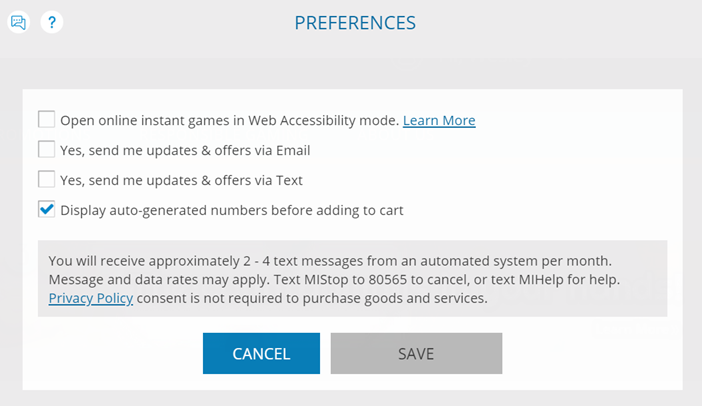
- Select Tools > Preferences.
- Toggle Email and/or SMS communication settings to their desired preference.
If the player does NOT have access to their account:
- Verify the player’s identity using standard verification procedures.
- Access the player’s account in NeoSphere.
- Locate communication preferences:
- Check or uncheck Allow Emails and/or Allow SMS based on the player’s request.

- Check or uncheck Allow Emails and/or Allow SMS based on the player’s request.
- Save the changes.
- Refresh the account to confirm updates were applied.
Case Logging Requirements:
- Owner: Customer Support / Support
- Category: Account Changes
- Subcategory: Change of Contact Details
- Subject: Change of Contact Details
- Resolved: Yes
Additional Information / Tips
- Encourage players to manage preferences themselves when possible for faster updates.
- Changes should take effect immediately after saving.
- Always confirm the player’s desired communication preference before making changes.
- Ensure proper identity verification when making updates on behalf of the player.
Variations / Related Questions Phrased Differently
- “How do I stop getting emails?”
- “I don’t want text messages anymore.”
- “How do I sign up for promotional emails?”
- “Can you turn off SMS notifications?”
- “I want to receive marketing messages again.”
- “How do I change my communication preferences?”
Common Issues / Troubleshooting
Issue: Player still receiving emails after opting out
- Confirm settings were properly saved in account preferences.
- Advise player to allow time for system updates and check spam filters.
Issue: Player cannot access account to update preferences
- Complete preference update in NeoSphere after verifying identity.
Issue: Preferences not saving
- Refresh the account and reapply the changes.
Issue: Player unsure whether changes were applied
- Confirm settings in NeoSphere and reassure player changes are active.
Was this article helpful?
That’s Great!
Thank you for your feedback
Sorry! We couldn't be helpful
Thank you for your feedback
Feedback sent
We appreciate your effort and will try to fix the article