Mobile Phone
- To start, select Sign In from the menu.
- To reach the menu, select the “ ” icon in the upper-left portion of your screen.
- Then, select “Forgot Password?” to prompt the "Forgot Password" screen.
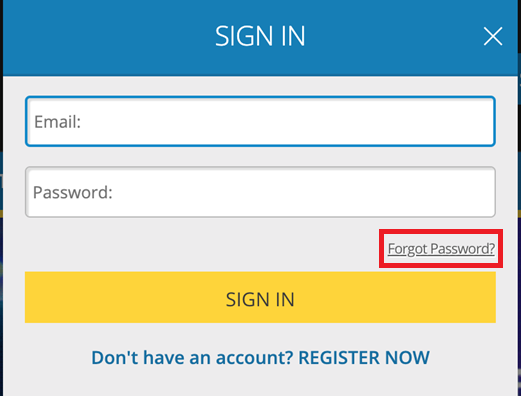
- On the Forgot Password screen, complete the following steps:
- Input the email address that you registered with your Michigan Lottery account
- Select whether to have the 6-digit security code sent via email to the email address registered with your Michigan Lottery account or via text to the mobile phone number registered with your Michigan Lottery account.
- Select the CONTINUE button.
- You should receive a 6-digit security code via email or text, depending on the send option that was selected. The code may take a few minutes to arrive.
- On the SET NEW PASSWORD page, complete the following steps:
- Input the 6-digit security code that you received via email or text.
- Enter your new password in both fields. Passwords must have 8-16 characters and contain at least 2 of the following: Uppercase (A-Z), Lowercase (a-z), Numbers (0-9), Symbols ( + * . @ ! # $ - _ , % / [ ] ~ ).
- Select the SUBMIT button after confirming your new password. This will prompt an UPDATE SUCCESSFUL pop-up.
- On the UPDATE SUCCESSFUL pop-up, select the CONTINUE TO SIGN IN button and sign in with your new password.
- An email confirmation will be sent to your email address to confirm that changes have been made to your Michigan Lottery account.
Was this article helpful?
That’s Great!
Thank you for your feedback
Sorry! We couldn't be helpful
Thank you for your feedback
Feedback sent
We appreciate your effort and will try to fix the article