Upload Ticket Photo
Claiming Your Winnings
When do I need to upload a photo of my ticket?
Players must upload photos of their retail ticket when claiming prizes of $1,000 or more. The required prize threshold may vary based on system configuration.
How do I upload my ticket?
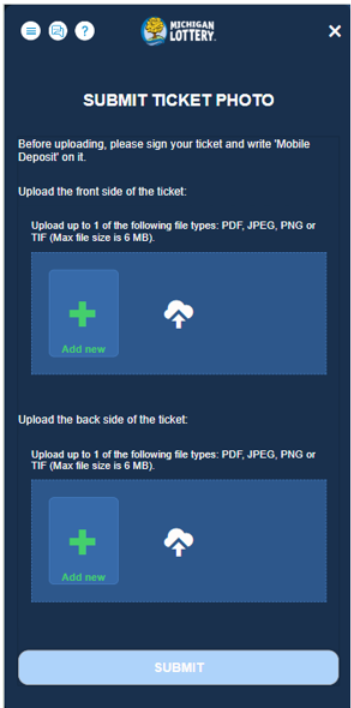
The "Claim Your Winnings" pop-up includes an "Upload Your Ticket" button. Selecting this button opens the ticket photo submission widget. 
What photos do I need to provide?
You must upload two photos of your ticket: one showing the front side and one showing the back side. Separate upload sections are provided for each image.
Do I need to sign my ticket before uploading it?
Yes. Before uploading your ticket photos, sign your ticket and write "Mobile Deposit" on it.
When can I submit my ticket photos?
The "Submit" button becomes available only after both the front and back ticket images have been uploaded.
When does the claim process begin?
The Remote Ticket Cashing process begins only after you click the "Submit" button. No redemption or pending prize record is created before submission.
What happens if I close the upload screen before submitting?
If you close the ticket upload widget before submitting your photos, a "Complete Ticket Upload" pop-up will be displayed. 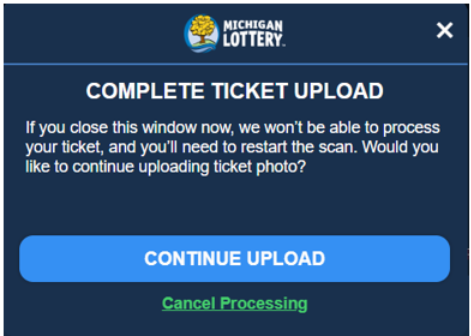
Can I cancel the ticket upload process?
Yes. If you choose to cancel, a confirmation pop-up will appear before the process is ended.
What happens if I cancel the process?
If you cancel the ticket upload process, you must restart the ticket scanning procedure from the beginning before submitting another claim.
Was this article helpful?
That’s Great!
Thank you for your feedback
Sorry! We couldn't be helpful
Thank you for your feedback
Feedback sent
We appreciate your effort and will try to fix the article