Article Title
Voucher Withdrawals
Category
Withdrawals / Voucher Processing
General Information
Voucher withdrawals require identity verification before players can proceed with cashout. Agents are responsible for ensuring all documentation is properly received, reviewed, and approved in NeoSphere prior to allowing withdrawal.
Purpose / Objective
To guide agents in verifying voucher withdrawal documentation, approving required items in NeoSphere, and ensuring accounts are ready for cashout.
Scenario / Use Case
A player:
- Requests a voucher withdrawal
- Submits identification for cashout
- Needs verification before completing withdrawal
Acceptable Voucher Documentation
- A valid government-issued ID is required for retail voucher withdrawals
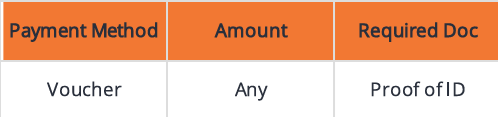
Approving Voucher Documents in NeoSphere
Step-by-Step
Navigate to the General Tab
- Set:
- ID Verification = Required
- Set:
Set the Reason field to:
- Cashout
Click:
- Save Changes
Select:
- ✅ Approve ID

Account Ready for Cashout
Before moving forward, confirm ALL the following:
✅ Documents Tab
- Required documents are received and approved
✅ General Tab
- ID verification shows Approved (if required)
✅ Payments Tab
- Cashout payment method is Approved (if applicable)
✅ When All Steps Are Complete
- Player is ready for withdrawal
- Proceed with cashout process
- ❗ No case creation required
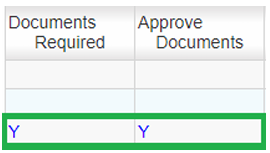
Documents Still Required for Cashout
If documents are incomplete or missing:
Actions
Send email requesting required documents:
- #Compliance Ask For ID
- #Compliance Payment Method Blocked - Pending Withdrawal
Create a Compliance case
Case Logging Requirements (Pending Documents)
- Owner: Compliance
- Category: Withdrawals / Deposit & Bonus (depending on system)
- Subcategory: Other (description required)
- Subject: Pending Withdrawal Documentation
- Resolved: No
Key Rules
- ID must be approved before cashout
- Payment method must be validated if applicable
- Do not proceed with withdrawal until all requirements are met
- Missing documentation must always trigger:
- Email request
- Case creation
Additional Information / Tips
- Always double-check all tabs before approving cashout
- Ensure accurate Reason = Cashout in General Tab
- Use clear communication when requesting documents
- Avoid delays by confirming completeness before escalation
Variations / Related Questions
- “Why can’t I withdraw my funds?”
- “What documents do I need to cash out?”
- “How do I verify my account for withdrawal?”
- “When will my withdrawal be approved?”
Common Issues / Troubleshooting
Issue: ID not approved
- Check General Tab → update and approve
Issue: Missing documents
- Send request and escalate
Issue: Payment method unverified
- Ensure approval in Payments Tab
Suggested Case Logging Notes
- Player submitted documents → verified and approved → ready for cashout
- Player missing withdrawal documents → requested via email and escalated
Example:
“Player requested voucher withdrawal. ID not yet submitted. Sent document request email and escalated to Compliance for review.”
Was this article helpful?
That’s Great!
Thank you for your feedback
Sorry! We couldn't be helpful
Thank you for your feedback
Feedback sent
We appreciate your effort and will try to fix the article