What is Web Accessibility mode for Online Games?
Michigan Lottery wants to ensure that online games are accessible for all Michigan players. Enabling web accessibility mode provides the ability to play Michigan Lottery online instant games in text only mode. This option should provide an easier experience for playing online games with the Michigan Lottery while using a screen reader. Please see examples of the Web Accessibility mode enabled and not enabled below:
Web Accessibility Mode Enabled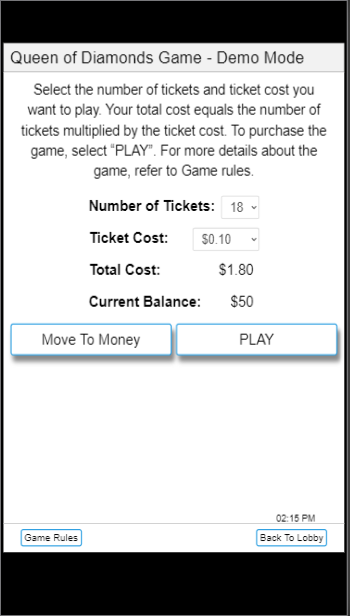
Web Accessibility Mode Not Enabled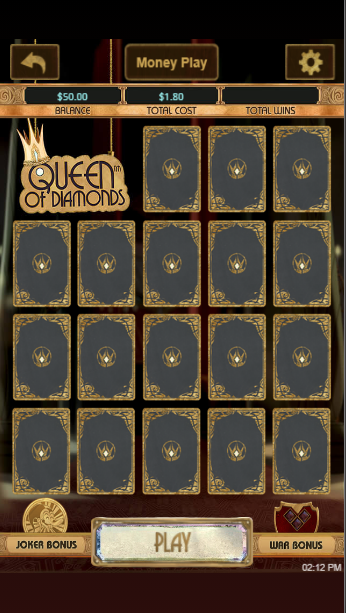
How to Enable Web Accessibility mode for Games
- Sign in and select "My Account".
- Select "Accessibility" from the "Tools" section.
- Select the check box for "Open online instant games in Web Accessibility mode." Make sure the box is checked.

- Select "Save".
Supported Screen Readers
A list of supported screen readers for Michiganlottery.com:
Jaws or NVDA (nonvisual desktop access) - Works for Windows
VoiceOver (MAC / iPhone)
Talkback (Android)
How to Disable Text Only Mode
- Sign in and select "My Account".
- Select "Accessibility" from the "Tools" section.
- Select the checkbox for "Open online instant games in Web Accessibility mode." and confirm the box is not checked.

- Select "Save".
Was this article helpful?
That’s Great!
Thank you for your feedback
Sorry! We couldn't be helpful
Thank you for your feedback
Feedback sent
We appreciate your effort and will try to fix the article